Promptu Launcher - Rocket Your Productivity

Home Help Feedback About Download

Promptu makes it faster and easier to get around your electronic world

Say goodbye to repetitive, time-consuming tasks, like hunting through your programs, folders, files, and bookmarks for the ones you need. Promptu lets you associate meaningful names with programs, folders, files, bookmarks, etc, and access them almost instantly from your keyboard in an intuitive way.

It doesn't matter if you are the type who doesn't really like computers or if you are a geek who loves computers. Promptu is built for the average user, but also includes advanced power user features for those who need them. Additionally, Promptu is provided completely free of charge.

Instead of trying to remember where things are, focus on getting things done. Promptu will save you minutes every day, and hours every year. Use Promptu to rocket your productivity.

News

Promptu 0.8.3.10 released - Sunday, 1 August 2010
This update to Promptu includes a bugfix for the keyboard shortcut Ctrl+V (Paste).

Promptu 0.8.3.9 released - Tuesday, 13 July 2010
This update to Promptu includes a minor bugfix for hotkey overrides.

Promptu 0.8.3.7 released - Friday, 21 May 2010
This update to Promptu includes a few bugfixes and behavior improvements. See the change log for more information.

How Promptu Works

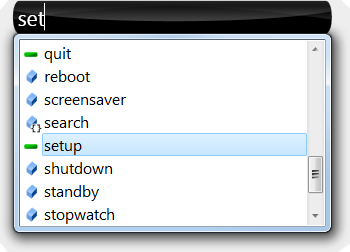
When you start Promptu for the first time, you associate a hotkey combination with Promptu, such as Ctrl+Q. When you press that combination, Promptu opens a box (the prompt) next to the mouse cursor. The prompt looks similar to this: (Note: hotkey combinations can be changed in the setup dialog)

Then you start typing. As you type, Promptu makes suggestions based on your commands and usage patterns.

When the entry you want becomes selected, press Enter and Promptu will launch it for you. Promptu will then hide itself until you press your hotkey combination again.

Custom Commands

Adding your own commands is very easy. Usually, all you need to provide is a name and the path (e.g. web address or file path).

See the help page for more information on how to create commands.

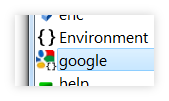
Promptu even has features to help you easily get the path.

You can drag the eyedropper in the command editor over a program's window to extract its path. You can also drag the eyedropper over the address bar in Windows Explorer to extract the address. (Note: you must have Display full path enabled in Windows Explorer to extract addresses from Windows Explorer)

Promptu also allows you to drag and drop a file or folder from Windows Explorer into the command editor to get its path.

After you add commands, they will show up in the list of suggestions.

Additional Feature Highlights

  • Lists let you divide up your commands for sharing and also enable you to avoid intermixing imported and shared commands with your main list of commands.

  • Automatically maintain and synchronize lists between Promptu users and computers with Promptu's list sharing/publishing feature.

  • Namespaces allow you to intuitively categorize your commands. You can also "hide" commands behind other commands using namespaces.
  • Using Ctrl+Enter instead of Enter at the prompt copies the path that would be executed to the clipboard instead of executing it.

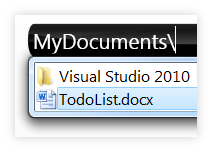
  • Quickly explore your files and folders using Promptu and the suggestion provider. The suggestion provider will list the contents of the folder you are in. You can use both normal paths (such as C:\folder\) and commands that point to folders (if command folder takes you to C:\folder\, you can use folder\anotherFolder\ to access C:\folder\anotherFolder).

  • Commands can contain more than static instructions. Using Promptu's ITL (Input Transformation Language), commands can take parameters from the prompt (optionally or mandatorily) and even execute and use results from external .NET code!

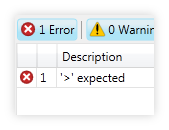
  • When building commands that include ITL, Promptu provides an automatic compiler in the command editor that alerts you of any errors as you type.

  • Promptu is portable and self-contained (does not use the registry), and does not care where you put it provided the location has read/write permissions. You can even put Promptu on a USB drive and take it with you!

  • A calculator. Simply type ={math expression} (e.g. =1+1) in the prompt and press Enter.

  • Ability to import SlickRun *.qrs files as Promptu lists.

Promptu Development Roadmap

Summer 2010

  • Design and create plug-in API to enable the development of Promptu add-ons by the community
  • Create an automatic indexing plug-in that coincides with Promptu's philosophy and design
  • Create an area for the community to share lists and add-ons

Why did you choose "Promptu" as a name?

Promptu is a form of the Latin word Promptus meaning "within easy reach, at one's disposal or command".

Its English derivatives include:
  • Prompt
  • Impromptu
  • Teleprompter

The name Promptu was chosen because its meaning captures the essence of this software project.

How can I support Promptu?

If you like Promptu, tell your friends and help spread the word!

You can also support Promptu by shopping at Amazon using this link or by using the amazon command included with Promptu.